
We take the online safety of our children very seriously. Children at Stourport Primary Academy are expected to follow our online safety rules, and pupils are reminded of these during Computing lessons.
All children receive online safety education, and they are required to sign an Acceptable Use Policy. For very young children, staff and parents share the responsibility to protect them through this policy.
To view our Online Safety Policy, please click here.
Families can visit ThinkUKnow to access advice and support on how to keep children safe from sexual abuse, both online and offline. Articles provide guidance on topics as diverse as challenging harmful sexual attitudes and promoting positive behaviours; helping a child with autism negotiate life online; supporting a child who has been sexually abused; and dealing with a range of online issues such as sending nude selfies and viewing pornography. Users will find films, downloadable guides and useful links to support organisations. Families can also use the CEOP Safety Centre , where abuse and exploitation can be reported directly to CEOP.
If you are worried about cyber bullying or anything else on the internet please tell an adult. You can also report internet abuse by clicking here. You can also call Childline on 0800 1111 or visit their website here.
S.M.A.R.T
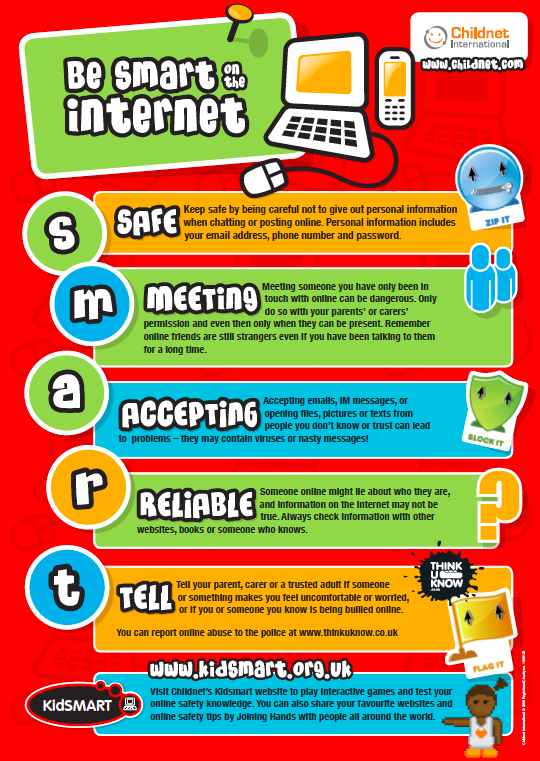
Whenever you go online, you need to be S.M.A.R.T.
Children here at Stourport Primary Academy are taught to be S.M.A.R.T. when they go online, at home or at school. During weekly Enrichment lessons children are taught the importance of being S.M.A.R.T. This is done through the use of the cartoon series Kara, Winston and the SMART Crew and class discussions.
S for Safe – Keep safe by being careful not to give out PERSONAL INFORMATION when chatting or posting online. Personal information includes your e-mail address, phone number, age and passwords.
M for Meeting – Meeting someone when you have been in touch with them online can be dangerous. Remember online friends are still strangers.
A for Accepting – Accepting emails, messages or opening files, pictures or texts from people your don’t know or trust can lead to problems. They may contain viruses or nasty messages.
R for Reliable – Someone online might lie about who they are and information on the Internet may not be true. Always check information with other websites, books or someone who knows.
T for Tell – Tell your parent, carer, teacher or a trusted adult if someone or something makes you feel uncomfortable or worried or of you or someone you know is being bullied online.
With children being taught the importance of being S.M.A.R.T. whenever they use computer equipment, this will lead to a safer time online.
To download the S.M.A.R.T. poster provided by Childnet please CLICK HERE.
Other Online Safety lessons follow the Adventures of Lee and Kim, understanding what can happen when you Play, Like & Share and see what effects Cyber Bullying can have on a child through Joe’s Story. These lessons are supported by CEOP(Child Exploitation & Online Protection Centre), Childnet International and Digizen. We also take part in the yearly National Safer Internet Day as well as run workshops for parents.
Should you ever have any questions or concerns about Safeguarding or Online Safety, please feel free to contact your child’s class teacher or one of the Safeguarding team listed on the School Safeguarding Contacts tab.
CEOP – Report Abuse
If you are in a situation in which you are not able to follow the S.M.A.R.T. rules and tell an adult if something is upsetting you on the internet, you can click the button below and make a report on what is troubling you.